

Anki
Anki is a free and open-source flashcard application built around spaced repetition to assist with long-term retention. It allows users to create customized decks incorporating text, audio, images, and LaTeX formatting, as well as import shared decks from other learners.
github.com · Official website
- ✓ Official source (winget)
- ✓ SHA256 taken from the official repository
- ✓ Last checked: Nov. 4, 2026
- This is not a virus scan. Check on VirusTotal
- Version
- 26.09.3
- Release date
- Sept. 23, 2026
- License
- AGPL-3.0-or-later
- Installer type
- wix
How do I use this?
Type Terminal in the Start menu and open it, paste the command (Ctrl+V or right-click) and press Enter. It uses winget, Windows' own package manager, to install the program from its official source.
winget install --id Anki.Anki -eSHA256 (file verification)
8a45823d1c31017cebb7d3af4493d69b6ae3c185345fcb2390ede4af01e0a950github.com · Official website
- ✓ Official source (Homebrew)
- ✓ SHA256 taken from the official repository
- ✓ Last checked: Nov. 4, 2026
- This is not a virus scan. Check on VirusTotal
- Version
- 26.09.3
- License
- AGPL-3.0-or-later
- Installer type
- dmg
How do I use this?
This command needs Homebrew; if you don't have it, first run the install command from brew.sh. Then open Terminal (Applications > Utilities > Terminal), paste the command and press Enter.
brew install --cask ankiSHA256 (file verification)
b36fe8f6c015a602feaf3ef38f5967c27c8964ee30a5c74ca2532225cf602345flathub.org · Official website
- ✓ Official source (Flathub)
- ✓ Last checked: Nov. 4, 2026
- Version
- 26.09.3
- Release date
- Sept. 23, 2026
- License
- AGPL-3.0-or-later
- Installer type
- flatpak
How do I use this?
Open a terminal, paste the command and press Enter. Flatpak and Flathub must be set up; Linux Mint has them by default, for other distributions see flathub.org/setup.
flatpak install flathub net.ankiweb.AnkiWe couldn't find a Android version of Anki in the official repositories; check the publisher's website.
Platform pages: Windows · macOS · Linux · Android
Old versions (10)
Security update: according to the publisher's release notes, Anki 26.09.3 fixes security vulnerabilities. If you use an older version, update.
Official release notes →
Anki 26.09.3: what's new?
- Includes important security fixes (upgrading to 26.09+ as soon as possible is recommended).
- Fixed an issue on Windows where system-wide upgrades failed to properly replace old versions, causing startup crashes.
- Fixed a 'Card modified' error in the Cards Info screen when FSRS is disabled or memory state is missing, and resolved duplicate restart prompts in Preferences.
- Safe mode now forces software rendering, and extracted Linux tarball directory names now include the application version.
Summarized from the publisher's release notes.
Highlights
- Spaced repetition scheduling algorithm to optimize review intervals
- Rich media support including audio clips, images, and LaTeX
- Extensible architecture supporting third-party add-ons
- Deck import and export capabilities across common formats
Who is it for?
Intended for language learners, medical and law students, and professionals needing to commit large amounts of factual information to memory.
Good to know before installing
- The interface is functional and straightforward, carrying a moderate learning curve for new users.
- Advanced card styling requires basic knowledge of HTML and CSS.
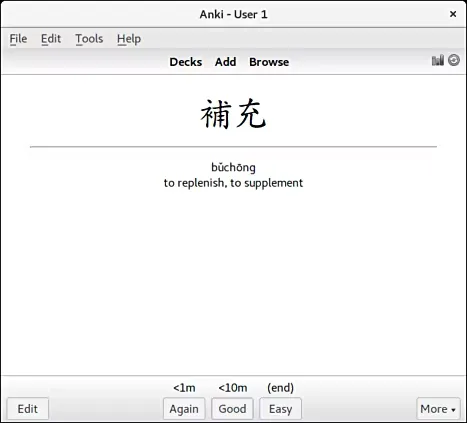
Screenshots
How to install
Windows
- Download the installer via our link or open the command prompt.
- Execute `winget install --id Anki.Anki -e` or run the setup executable.
- Follow the setup prompts and launch Anki.
macOS
- Click the download button for the installer or launch Terminal.
- Run `brew install --cask anki` or open the DMG file and move Anki to Applications.
- Launch Anki directly from the Applications folder.
Linux
- Click the official download button to open Flathub or launch your terminal.
- Run `flatpak install flathub net.ankiweb.Anki` to install.
- Open Anki from your desktop application launcher.
Alternatives
- Mnemosyne
- RemNote
- Quizlet
Frequently asked questions
Is Anki free to use?
Yes, the desktop application is free and open source under the AGPL license.
Can I attach audio and images to cards?
Yes, cards support formatted text, images, audio recordings, and LaTeX equations.
Does Anki support add-ons?
Yes, the desktop versions support community-created add-ons to customize functionality.