

BleachBit
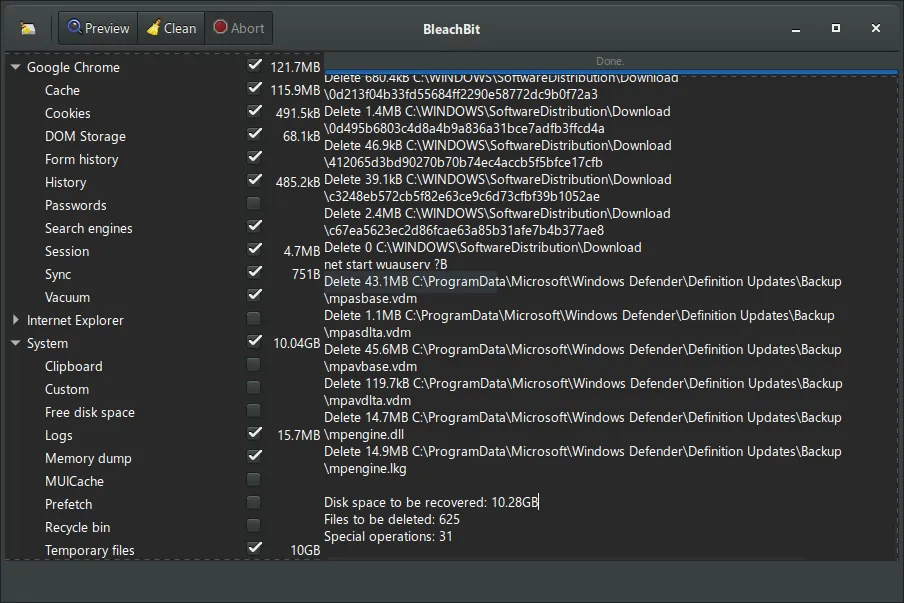
BleachBit is an open-source system cleaner and privacy tool designed to free up disk space and remove lingering traces of activity. It scans for and deletes cache, temporary files, cookies, and system logs produced by web browsers and various software. In addition to basic cleaning, it includes options to securely shred files and overwrite free disk space to prevent data recovery.
download.bleachbit.org · Official website
- ✓ Official source (winget)
- ✓ SHA256 taken from the official repository
- ✓ Last checked: Nov. 4, 2026
- This is not a virus scan. Check on VirusTotal
- Version
- 6.0.6.633
- License
- GPL-3.0
- Installer type
- nullsoft
How do I use this?
Type Terminal in the Start menu and open it, paste the command (Ctrl+V or right-click) and press Enter. It uses winget, Windows' own package manager, to install the program from its official source.
winget install --id BleachBit.BleachBit -eSHA256 (file verification)
a8d27535cdc53e89c21090eabca6026d32c4d385863f8dfc6fc8814bda7881c4flathub.org · Official website
- ✓ Community package (Flathub)
- ✓ Last checked: Nov. 4, 2026
- Version
- v6.0.6
- Release date
- Oct. 18, 2026
- License
- GPL-3.0
- Installer type
- flatpak
How do I use this?
Open a terminal, paste the command and press Enter. Flatpak and Flathub must be set up; Linux Mint has them by default, for other distributions see flathub.org/setup.
flatpak install flathub org.bleachbit.BleachBitWe couldn't find a macOS version of BleachBit in the official repositories; check the publisher's website.
We couldn't find a Android version of BleachBit in the official repositories; check the publisher's website.
Platform pages: Windows · macOS · Linux · Android
Old versions (10)
BleachBit 6.0.6.633: what's new?
Highlights
- Cleans browser caches, cookies, history, and temporary download records
- Deletes unused system logs, temporary files, and localization data to reclaim drive space
- Secure file shredding to permanently destroy sensitive documents
- Wipes free disk space to hide residual traces of previously deleted files
Who is it for?
BleachBit is designed for desktop users and administrators seeking to recover disk space and securely eliminate application and browsing history traces.
Good to know before installing
- Supported exclusively on Linux and Windows platforms.
- Selecting sensitive system cleaning options without review can unintentionally erase browser sessions or saved passwords.
- Does not run real-time automated cleanup schedules out of the box.
Screenshots
How to install
Windows
- Download the official installer using the button on this page, or open a command prompt.
- Alternatively, run 'winget install --id BleachBit.BleachBit -e' to install directly via the package manager.
- Open the downloaded installer and complete the setup wizard to finish.
Linux
- Click the official download button on our site to visit Flathub, or open your terminal.
- Run the command 'flatpak install flathub org.bleachbit.BleachBit' to download and install.
- Launch BleachBit from your desktop application launcher or run 'flatpak run org.bleachbit.BleachBit'.
Alternatives
- Stacer
- Glary Utilities
- CCleaner (Free version available)
Frequently asked questions
Does BleachBit need administrator or root privileges?
Standard permissions are enough to clean user caches and browsers, but cleaning system-wide logs and temporary system directories requires elevated rights.
Can files removed by BleachBit be recovered?
Files removed with the file shredding feature or sanitized via free space wiping cannot be retrieved with conventional data recovery software.
Is BleachBit completely free to use?
Yes, BleachBit is free, open-source software distributed under the GPL-3.0 license.