

Burp Suite Community
Burp Suite Community Edition is an interception proxy and testing platform designed for web application security analysis and debugging. Provided by PortSwigger as freeware, it enables users to capture, inspect, and modify HTTP and HTTPS traffic passing between a browser and web servers.
portswigger-cdn.net · Official website
- ✓ Official source (winget)
- ✓ SHA256 taken from the official repository
- ✓ Last checked: Nov. 4, 2026
- This is not a virus scan. Check on VirusTotal
- Version
- 2026.3.3
- Release date
- April 21, 2026
- License
- Freeware
- Installer type
- exe
How do I use this?
Type Terminal in the Start menu and open it, paste the command (Ctrl+V or right-click) and press Enter. It uses winget, Windows' own package manager, to install the program from its official source.
winget install --id PortSwigger.BurpSuite.Community -eSHA256 (file verification)
74ba153769298fdf87cd1f0dc4642e3ce0d71844545ffd10442d0f912da42c38portswigger-cdn.net · Official website
- ✓ Official source (Homebrew)
- ✓ SHA256 taken from the official repository
- ✓ Last checked: Nov. 4, 2026
- This is not a virus scan. Check on VirusTotal
- Version
- 2026.10.1
- License
- Freeware
- Installer type
- 1&type=macosarm64
How do I use this?
This command needs Homebrew; if you don't have it, first run the install command from brew.sh. Then open Terminal (Applications > Utilities > Terminal), paste the command and press Enter.
brew install --cask burp-suiteSHA256 (file verification)
77a343a0e8ac80784382f33c54ce8c0516618ad7d92a97eb6e014b57d8f2f07dflathub.org · Official website
- ✓ Community package (Flathub)
- ✓ Last checked: Nov. 4, 2026
- Version
- 2026.3.3
- Release date
- April 20, 2026
- License
- Freeware
- Installer type
- flatpak
How do I use this?
Open a terminal, paste the command and press Enter. Flatpak and Flathub must be set up; Linux Mint has them by default, for other distributions see flathub.org/setup.
flatpak install flathub net.portswigger.BurpSuite-CommunityWe couldn't find a Android version of Burp Suite Community in the official repositories; check the publisher's website.
Platform pages: Windows · macOS · Linux · Android
Old versions (10)
Burp Suite Community 2026.3.3: what's new?
- Improvements to Burp's installation process.
Summarized from the publisher's release notes.
Highlights
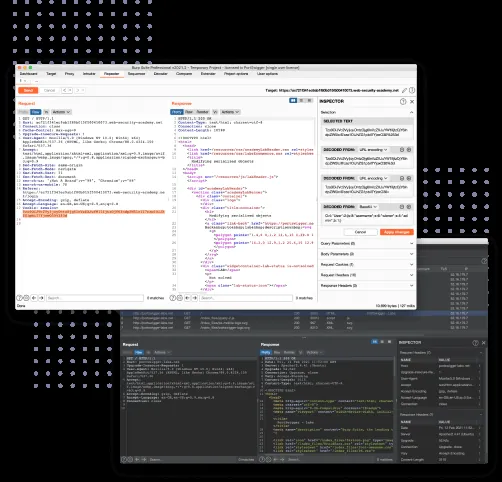
- Interception proxy to capture, view, and modify raw HTTP/S requests and responses in real time
- Repeater tool to manually manipulate and resend individual web requests to analyze server responses
- Decoder utility to decode and encode data across formats including URL, Base64, and Hex
- Comparer tool to quickly identify differences between pairs of requests or responses
- Integrated Chromium-based browser preconfigured to route traffic directly through the proxy
Who is it for?
Security students, penetration testers, and web developers performing manual traffic inspection and vulnerability analysis on web applications.
Good to know before installing
- Does not include the automated vulnerability scanner found in the commercial edition.
- The Intruder tool has intentional rate limiting that slows down automated attacks.
- Session state cannot be saved to a project file on disk for later use.
Screenshots
How to install
Windows
- Download the official installer using our download button or execute 'winget install --id PortSwigger.BurpSuite.Community -e' in PowerShell.
- Run the downloaded installer and follow the setup wizard.
- Start Burp Suite Community from the Start menu once installation finishes.
macOS
- Download the official installer using the link on this page or run 'brew install --cask burp-suite' via Terminal.
- Open the downloaded installer and drag Burp Suite into your Applications folder.
- Launch the program from Applications and complete the initial setup.
Linux
- Use the official download link on this page to visit Flathub or run 'flatpak install flathub net.portswigger.BurpSuite-Community' in your terminal.
- Follow the terminal prompts to confirm the package installation.
- Launch Burp Suite Community from your desktop application launcher.
Alternatives
- OWASP ZAP
- mitmproxy
- Caido
Frequently asked questions
Is Burp Suite Community Edition completely free?
Yes, Burp Suite Community Edition is free of charge for manual web application testing.
Does the Community Edition include an automated vulnerability scanner?
No, the automated web vulnerability scanner is exclusive to the commercial Burp Suite Professional edition.
Can I save my working session to a project file?
No, saving project files to disk is disabled in the Community Edition; all work exists solely in memory during the active session.