

GitHub Desktop
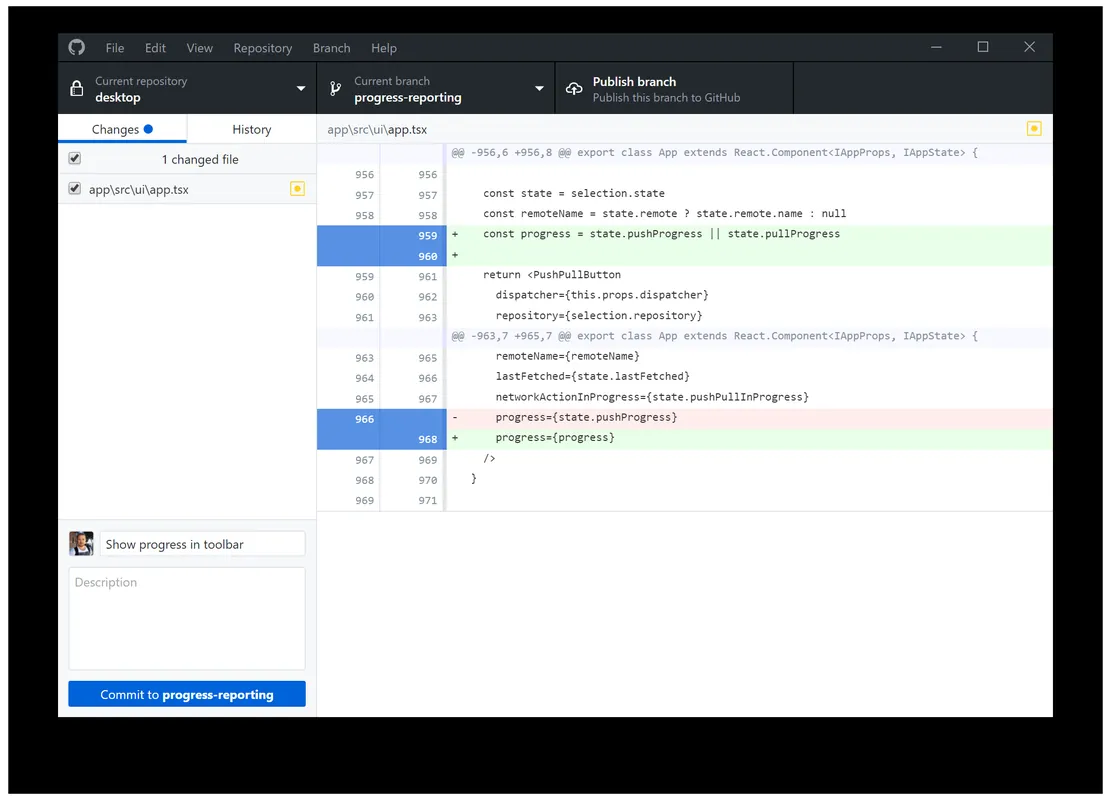
GitHub Desktop is an open-source graphical user interface that simplifies interacting with Git repositories and GitHub. It allows developers to manage branches, commit changes, publish code, and review history without using the command line.
desktop.githubusercontent.com · Official website
- ✓ Official source (winget)
- ✓ SHA256 taken from the official repository
- ✓ Last checked: Nov. 4, 2026
- This is not a virus scan. Check on VirusTotal
- Version
- 3.6.10
- Release date
- Oct. 26, 2026
- License
- MIT
- Installer type
- exe
How do I use this?
Type Terminal in the Start menu and open it, paste the command (Ctrl+V or right-click) and press Enter. It uses winget, Windows' own package manager, to install the program from its official source.
winget install --id GitHub.GitHubDesktop -eSHA256 (file verification)
36cae76228a32cfabcf2bf3e17e6bb3f4e294b70692ca88a163595e6603dd835desktop.githubusercontent.com · Official website
- ✓ Official source (Homebrew)
- ✓ SHA256 taken from the official repository
- ✓ Last checked: Nov. 4, 2026
- This is not a virus scan. Check on VirusTotal
- Version
- 3.6.10-ffeefe5d
- License
- MIT
- Installer type
- zip
How do I use this?
This command needs Homebrew; if you don't have it, first run the install command from brew.sh. Then open Terminal (Applications > Utilities > Terminal), paste the command and press Enter.
brew install --cask githubSHA256 (file verification)
8d891e3c891c5b583869fc99b445c91ac77a6bd787161ddd492f485de36e6357flathub.org · Official website
- ✓ Community package (Flathub)
- ✓ Last checked: Nov. 4, 2026
- Version
- 3.4.13-linux1
- Release date
- Feb. 24, 2025
- License
- MIT
- Installer type
- flatpak
How do I use this?
Open a terminal, paste the command and press Enter. Flatpak and Flathub must be set up; Linux Mint has them by default, for other distributions see flathub.org/setup.
flatpak install flathub io.github.shiftey.DesktopWe couldn't find a Android version of GitHub Desktop in the official repositories; check the publisher's website.
Platform pages: Windows · macOS · Linux · Android
Old versions (3)
GitHub Desktop 3.6.10: what's new?
- Fixed an issue by updating Git for Windows.
- Updated Git for Windows to version 2.56.0.windows.4.
Summarized from the publisher's release notes.
Highlights
- Visual diff tool to review code changes before committing
- Branch management and creation directly from the interface
- Seamless integration with GitHub and GitHub Enterprise accounts
- Support for co-authoring commits and syntax-highlighted diffs
Who is it for?
GitHub Desktop is for software developers, designers, and students who want to manage version control and GitHub workflows visually rather than through terminal commands.
Good to know before installing
- Lacks support for advanced Git features like interactive rebasing.
- Interface and features are primarily optimized for GitHub rather than third-party Git hosts.
Screenshots
How to install
Windows
- Download the official Windows installer from our download link.
- Run the downloaded setup file to complete installation.
- Alternatively, execute 'winget install --id GitHub.GitHubDesktop -e' in Command Prompt.
macOS
- Download the official installer file using the download button on this page.
- Open the downloaded package and drag GitHub Desktop to your Applications folder.
- Alternatively, run 'brew install --cask github' in Terminal.
Linux
- Click the official download button to open the Flathub page.
- Click Install or run 'flatpak install flathub io.github.shiftey.Desktop' in your terminal.
- Launch GitHub Desktop from your application menu.
Alternatives
- Sourcetree
- GitKraken
- Lazygit
Frequently asked questions
Is GitHub Desktop free to use?
Yes, GitHub Desktop is free and open-source software licensed under the MIT License.
Can I use GitHub Desktop with Git services other than GitHub?
While optimized for GitHub, it supports local Git repositories and basic Git operations for other remote hosts.
Does GitHub Desktop replace Git CLI entirely?
It covers most common Git workflows visually, but advanced Git commands still require the terminal.