

OBS Studio
OBS Studio is a free and open-source application designed for video recording and live streaming. Developed by the OBS Project, it allows users to capture real-time audio and video from multiple sources, mix scenes, and broadcast directly to platforms like Twitch and YouTube.
github.com · Official website
- ✓ Official source (winget)
- ✓ File is identical to the one the publisher released (SHA256 matched)
- ✓ Last checked: Nov. 4, 2026
- This is not a virus scan. Check on VirusTotal
- Version
- 33.0.0
- Release date
- Oct. 23, 2026
- License
- GPL-2.0
- Installer type
- nullsoft
How do I use this?
Type Terminal in the Start menu and open it, paste the command (Ctrl+V or right-click) and press Enter. It uses winget, Windows' own package manager, to install the program from its official source.
winget install --id OBSProject.OBSStudio -eSHA256 (file verification)
3bf55dae6d9db651505828090de74540296c742ed2a94a28cf055cb6ddc6bed3cdn-fastly.obsproject.com · Official website
- ✓ Official source (Homebrew)
- ✓ File is identical to the one the publisher released (SHA256 matched)
- ✓ Last checked: Nov. 4, 2026
- This is not a virus scan. Check on VirusTotal
- Version
- 33.0.1
- License
- GPL-2.0
- Installer type
- dmg
How do I use this?
This command needs Homebrew; if you don't have it, first run the install command from brew.sh. Then open Terminal (Applications > Utilities > Terminal), paste the command and press Enter.
brew install --cask obsSHA256 (file verification)
3d6b2eedeb56416602af635adaba32327fdf11ff9d2806a4ce7d5b608de73238flathub.org · Official website
- ✓ Official source (Flathub)
- ✓ Last checked: Nov. 4, 2026
- Version
- 33.0.1
- Release date
- Oct. 29, 2026
- License
- GPL-2.0
- Installer type
- flatpak
How do I use this?
Open a terminal, paste the command and press Enter. Flatpak and Flathub must be set up; Linux Mint has them by default, for other distributions see flathub.org/setup.
flatpak install flathub com.obsproject.StudioWe couldn't find a Android version of OBS Studio in the official repositories; check the publisher's website.
OBS Studio 33.0.0: what's new?
- Improved preview source snapping with a new visual indicator and full-axis alignment, plus updated number input (spinbox) behavior.
- Enabled NVENC support on Arm64, added hotkeys for controlling source audio monitoring, and updated support for NVIDIA Broadcast SDKs.
- Overhauled the plugin folder structure and fixed multiple crashes, including issues on macOS, Linux USB mic removal, and Studio Mode groups.
Summarized from the publisher's release notes.
Highlights
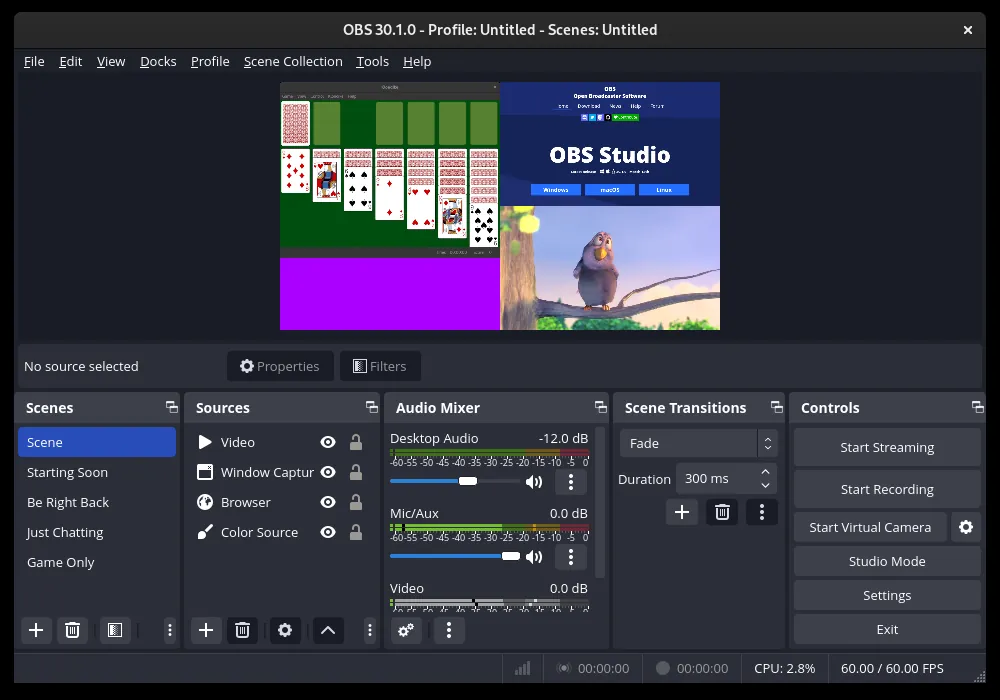
- Real-time video and audio capturing and scene composition
- Support for multiple sources including webcams, capture cards, desktop screens, and windows
- Built-in audio mixer with per-source filters like noise gate and suppression
- Scene transitions and customizable hotkeys for quick streaming controls
Who is it for?
Designed for content creators broadcasting to live platforms, gamers capturing gameplay, and educators or professionals recording video presentations and tutorials. It serves anyone needing modular control over multiple audio and video capture sources.
Good to know before installing
- The interface and configuration options present a moderate learning curve for new users.
- Encoding high-resolution video in real time can demand substantial CPU and GPU resources.
- It does not include built-in post-production video editing tools, requiring separate software to trim or edit recordings.
Screenshots
How to install
Windows
- Click the official download button to get the Windows installer.
- Run the executable file and follow the setup wizard.
- Alternatively, run 'winget install --id OBSProject.OBSStudio -e' in Command Prompt.
macOS
- Click the official download button to download the macOS installer.
- Open the downloaded file and drag OBS Studio to your Applications folder.
- Alternatively, run 'brew install --cask obs' in Terminal.
Linux
- Click the official download button on our page to open the Flathub page, or use Terminal.
- Run the command: flatpak install flathub com.obsproject.Studio
- Launch OBS Studio from your application menu.
Alternatives
- Streamlabs
- XSplit Broadcaster
- Bandicam (Trial)
Frequently asked questions
Is OBS Studio completely free to use?
Yes, OBS Studio is free and open-source under the GPL-2.0 license with no feature restrictions.
Can OBS Studio record gameplay without live streaming?
Yes, OBS Studio can be used solely as a local screen recorder without broadcasting live.
What streaming platforms are supported by OBS Studio?
It supports major services such as Twitch, YouTube, Facebook Live, and custom RTMP servers.