

Tailscale
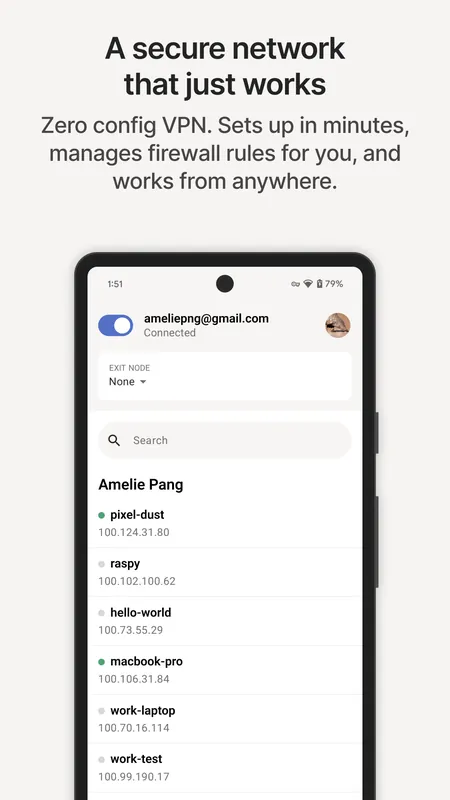
Tailscale is a mesh VPN built on top of the WireGuard protocol that connects your computers and devices into a single secure private network. It establishes direct, encrypted peer-to-peer connections between your systems without requiring manual port forwarding or custom proxy configurations. Distributed under an open-source BSD-3-Clause license, it simplifies internal network routing across different platforms.
pkgs.tailscale.com · Official website
- ✓ Official source (winget)
- ✓ SHA256 taken from the official repository
- ✓ Last checked: Nov. 4, 2026
- This is not a virus scan. Check on VirusTotal
- Version
- 1.104.5
- Release date
- Nov. 3, 2026
- License
- BSD-3-Clause
- Installer type
- burn
How do I use this?
Type Terminal in the Start menu and open it, paste the command (Ctrl+V or right-click) and press Enter. It uses winget, Windows' own package manager, to install the program from its official source.
winget install --id Tailscale.Tailscale -eSHA256 (file verification)
85412f3ce8b05bbc493311cc20e72c0f619285f95d351141cd9f49ca2d31a12apkgs.tailscale.com · Official website
- ✓ Official source (Homebrew)
- ✓ SHA256 taken from the official repository
- ✓ Last checked: Nov. 4, 2026
- This is not a virus scan. Check on VirusTotal
- Version
- 1.104.5
- License
- BSD-3-Clause
- Installer type
- pkg
How do I use this?
This command needs Homebrew; if you don't have it, first run the install command from brew.sh. Then open Terminal (Applications > Utilities > Terminal), paste the command and press Enter.
brew install --cask tailscale-appSHA256 (file verification)
f1a2afb589dc16487cff9f23c59d0021a1a4dcf8476d2637ab493c628422b810f-droid.org · Official website
- ✓ Official source (F-Droid)
- ✓ SHA256 taken from the official repository
- ✓ Last checked: Nov. 4, 2026
- This is not a virus scan. Check on VirusTotal
- Version
- 1.104.4-t938213198-gb9d487fe6
- Release date
- Oct. 31, 2026
- License
- BSD-3-Clause
- Installer type
- apk
SHA256 (file verification)
cce193c14cbbfcc7820a978691d2428676b52635cf435e7e2cf20b3725daaeb8We couldn't find a Linux version of Tailscale in the official repositories; check the publisher's website.
Tailscale 1.104.5: what's new?
- Fixed connectivity stalls affecting Tailscale SSH, Tailscale Serve, and tsnet on lossy networks.
- Resolved Tailscale SSH issues, preventing session disconnections on check mode expiration and hangs during restarts.
- Fixed a privilege escalation vulnerability in the Windows .exe installer during installation.
- Improved connection reliability on macOS, iOS, and tvOS when the network reports an unreachable destination.
Summarized from the publisher's release notes.
Highlights
- Mesh VPN architecture built on WireGuard encryption
- Direct peer-to-peer connections with automatic NAT traversal
- No manual firewall reconfiguration or port forwarding required
- Open-source core licensed under BSD-3-Clause
Who is it for?
Tailscale is designed for system administrators, developers, and remote workers who need secure, direct access to personal or organizational devices across different networks. It is ideal for accessing home servers, remote workstations, or private services without configuring firewall rules or manual port forwarding.
Good to know before installing
- Relies on a centralized coordination server hosted by Tailscale Inc. unless using self-hosted control planes like Headscale.
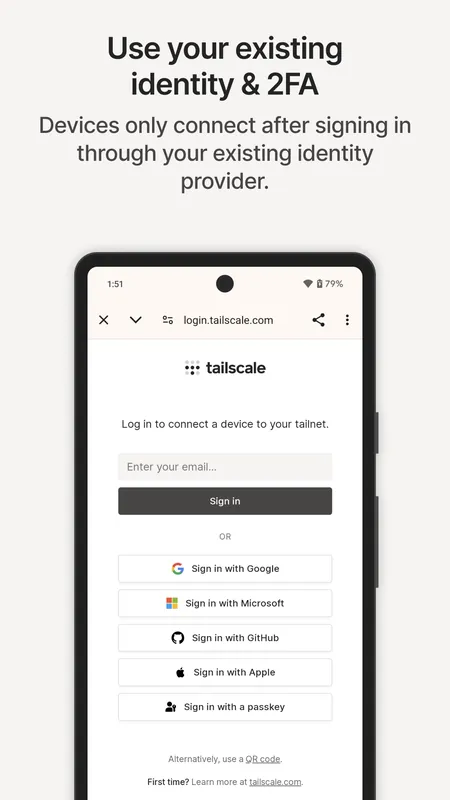
- Requires authentication through a third-party identity provider (such as Google, Microsoft, or GitHub) to manage network devices.
- Official client installation support for this listing is limited to Android, Mac, and Windows platforms.
Screenshots
How to install
Windows
- Click the official download button or run winget install --id Tailscale.Tailscale -e in your command line.
- Run the installer executable and complete the setup process.
- Click the Tailscale icon in the system tray and log in to join your network.
macOS
- Click the official download button or run brew install --cask tailscale-app in Terminal.
- Open the downloaded installer and add Tailscale to your Applications folder.
- Launch Tailscale from the menu bar and log in to connect.
Android
- Use the official download button on this page to visit the Google Play Store.
- Install the Tailscale application on your Android device.
- Open the app and authenticate to connect your device to your tailnet.
Alternatives
Frequently asked questions
Is Tailscale free to use?
Yes, Tailscale is open source and offers free tiers for personal use across your devices.
Does Tailscale replace a standard commercial VPN?
No, Tailscale is designed to securely interconnect your own devices into a private mesh network, not to route general web traffic through third-party servers.
Do I need to configure port forwarding for Tailscale?
No, Tailscale handles NAT traversal automatically, so manual firewall port forwarding is not required.