

Bruno
Bruno is an open-source desktop client designed for exploring and testing APIs. Unlike tools that rely on cloud synchronization, Bruno saves collections directly as plain text files on your local file system, allowing you to track and collaborate on API specifications using Git or any version control system.
github.com · Official website
- ✓ Official source (winget)
- ✓ SHA256 taken from the official repository
- ✓ Last checked: Nov. 4, 2026
- This is not a virus scan. Check on VirusTotal
- Version
- 4.3.0
- Release date
- Oct. 22, 2026
- License
- MIT
- Installer type
- nullsoft
How do I use this?
Type Terminal in the Start menu and open it, paste the command (Ctrl+V or right-click) and press Enter. It uses winget, Windows' own package manager, to install the program from its official source.
winget install --id Bruno.Bruno -eSHA256 (file verification)
e1149fba7def0bd5b9654d745c769a16e62212e2683c5a6523807262b369c3c3github.com · Official website
- ✓ Official source (Homebrew)
- ✓ SHA256 taken from the official repository
- ✓ Last checked: Nov. 4, 2026
- This is not a virus scan. Check on VirusTotal
- Version
- 4.3.0
- License
- MIT
- Installer type
- dmg
How do I use this?
This command needs Homebrew; if you don't have it, first run the install command from brew.sh. Then open Terminal (Applications > Utilities > Terminal), paste the command and press Enter.
brew install --cask brunoSHA256 (file verification)
bb4c4d8de817a6f529880627606137fd16346ddece547c6a0862e84bd1cc69bfflathub.org · Official website
- ✓ Official source (Flathub)
- ✓ Last checked: Nov. 4, 2026
- Version
- v4.3.0
- Release date
- Oct. 22, 2026
- License
- MIT
- Installer type
- flatpak
How do I use this?
Open a terminal, paste the command and press Enter. Flatpak and Flathub must be set up; Linux Mint has them by default, for other distributions see flathub.org/setup.
flatpak install flathub com.usebruno.BrunoWe couldn't find a Android version of Bruno in the official repositories; check the publisher's website.
Platform pages: Windows · macOS · Linux · Android
Old versions (10)
Bruno 4.3.0: what's new?
Highlights
- Stores collections directly on the filesystem as plain text files
- Native Git and version control compatibility without proprietary sync
- Fully offline operation with zero mandatory cloud accounts
- Support for composing and debugging REST and GraphQL requests
- Environment variables, scripting, and automated testing capabilities
Who is it for?
Software developers, QA engineers, and DevOps teams who need to design, test, and document APIs while keeping request files version-controlled locally.
Good to know before installing
- Lacks built-in cloud workspace sharing, requiring a Git repository for team sync.
- The ecosystem of third-party plugins is smaller compared to older API clients.
Screenshots
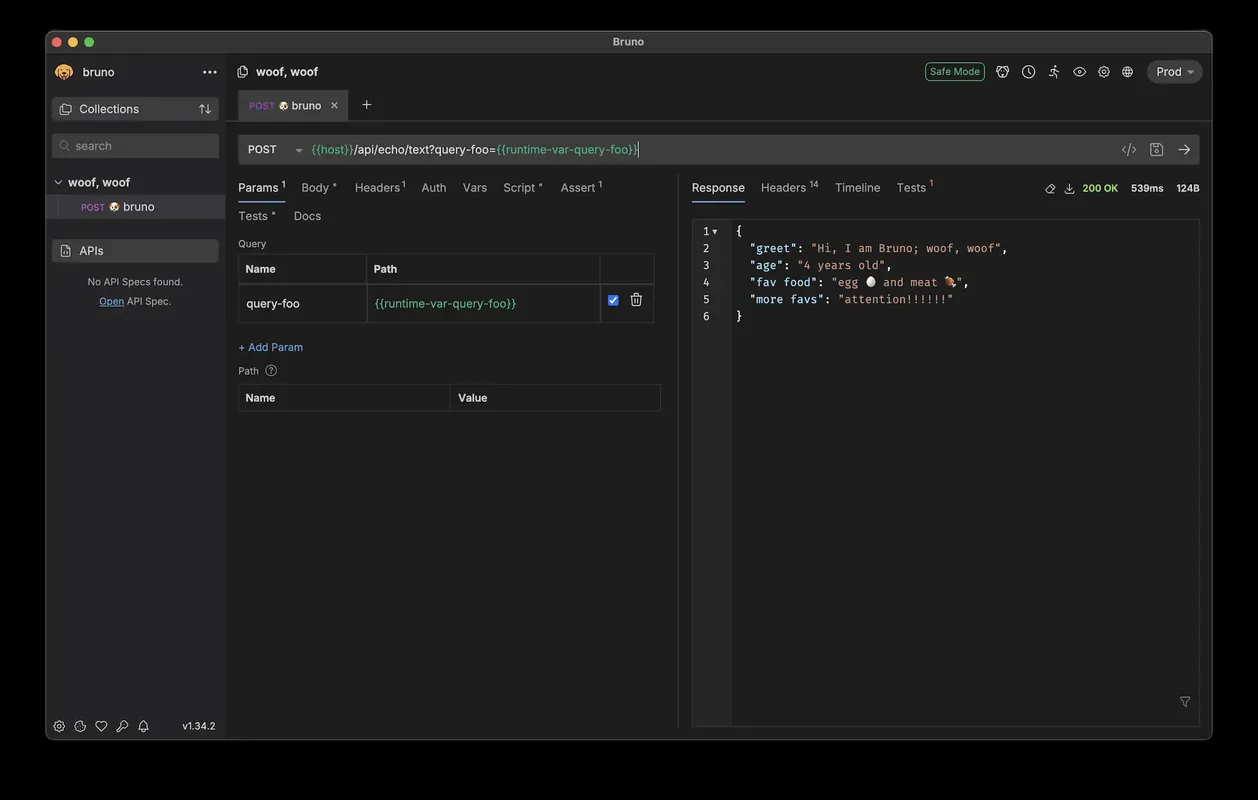
How to install
Windows
- Download the installer via our official download button or run 'winget install --id Bruno.Bruno -e' in a terminal.
- Execute the downloaded installer and complete the setup wizard.
- Start Bruno from the Start menu or desktop shortcut.
macOS
- Download the official installer using the link on this page or run 'brew install --cask bruno' in the terminal.
- Open the downloaded .dmg file and drag Bruno into your Applications folder.
- Open Bruno from Applications or Spotlight to begin creating requests.
Linux
- Use the official download link to open the Flathub page, or run 'flatpak install flathub com.usebruno.Bruno' in your terminal.
- Confirm the installation prompts in your terminal or software manager.
- Launch Bruno from your desktop application launcher.
Alternatives
- Insomnia
- Hoppscotch
- Postman (Free version available)
Frequently asked questions
Does Bruno require an account or cloud login?
No, Bruno works completely offline and does not require an account or cloud connection.
Where are API requests and collections stored?
They are stored directly in local folders on your computer using a plain-text markup language (Bru).
Can I import existing Postman collections into Bruno?
Yes, Bruno includes built-in support for importing Postman collections and environments.