

Postman
Postman can be used for free; some features are only in the paid edition.
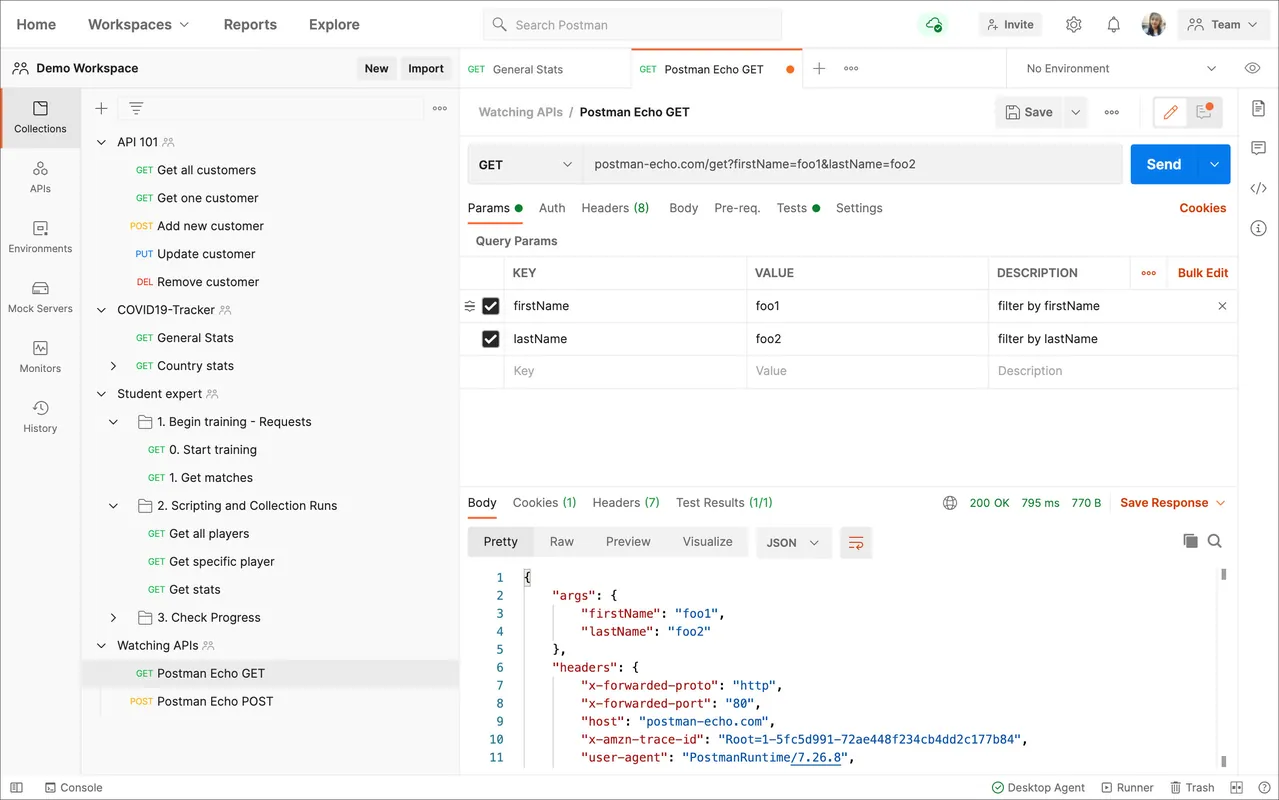
Postman is an API platform used for building, testing, and documenting APIs. It enables developers to send HTTP requests, inspect detailed server responses, automate test suites, and manage environments. Postman supports multiple protocol standards, making it a central tool in client-server debugging and modern backend workflows.
dl.pstmn.io · Official website
- ✓ Official source (winget)
- ✓ SHA256 taken from the official repository
- ✓ Last checked: Nov. 4, 2026
- This is not a virus scan. Check on VirusTotal
- Version
- 12.35.1
- Release date
- Nov. 3, 2026
- License
- Proprietary
- Installer type
- exe
How do I use this?
Type Terminal in the Start menu and open it, paste the command (Ctrl+V or right-click) and press Enter. It uses winget, Windows' own package manager, to install the program from its official source.
winget install --id Postman.Postman -eSHA256 (file verification)
07b5e2bf9c92c7094a8566d20943e01f100a795b131af8d3678e271d46bcd16adl.pstmn.io · Official website
- ✓ Official source (Homebrew)
- ✓ SHA256 taken from the official repository
- ✓ Last checked: Nov. 4, 2026
- This is not a virus scan. Check on VirusTotal
- Version
- 12.34.0
- License
- Proprietary
How do I use this?
This command needs Homebrew; if you don't have it, first run the install command from brew.sh. Then open Terminal (Applications > Utilities > Terminal), paste the command and press Enter.
brew install --cask postmanSHA256 (file verification)
bff311c819c450eea1f70314d68601450f4fcb6abd4cfd935f1c6641440b2f70flathub.org · Official website
- ✓ Community package (Flathub)
- ✓ Last checked: Nov. 4, 2026
- Version
- 12.35.0
- Release date
- Nov. 2, 2026
- License
- Proprietary
- Installer type
- flatpak
How do I use this?
Open a terminal, paste the command and press Enter. Flatpak and Flathub must be set up; Linux Mint has them by default, for other distributions see flathub.org/setup.
flatpak install flathub com.getpostman.PostmanWe couldn't find a Android version of Postman in the official repositories; check the publisher's website.
Highlights
- Request builder supporting HTTP, REST, GraphQL, gRPC, and WebSockets
- Collections system for grouping and sharing endpoint configurations
- Automated test scripting with pre-request scripts and assertions
- Environment and global variable management across deployment stages
- Built-in mock servers for simulating backend responses during development
Who is it for?
Software developers, backend engineers, and QA specialists building, debugging, or integrating APIs. It is primarily used to construct HTTP requests, inspect responses, automate test suites, and share API documentation with teams.
Good to know before installing
- Operates on a freemium model where advanced team collaboration, automated monitors, and higher cloud request limits require paid subscriptions.
- As an Electron-based application, it can consume a significant amount of system memory (RAM), especially with large collections.
- Many synchronization and collaborative features require an active Postman account and an internet connection.
Screenshots
How to install
Windows
- Click the official download button to save the installer or open a terminal.
- Alternatively, run this command: winget install --id Postman.Postman -e
- Run the installer executable and launch Postman from the Start menu.
macOS
- Click the official download button to obtain the installer or open Terminal.
- Optionally, install via Homebrew using: brew install --cask postman
- Open the downloaded package, move it to Applications, and launch the app.
Linux
- Click the official download button to access Flathub or open your terminal.
- Run the command: flatpak install flathub com.getpostman.Postman
- Launch Postman from your application menu or via the terminal.
Alternatives
- Insomnia
- Bruno
- Hoppscotch
Frequently asked questions
Is Postman open-source software?
No, Postman is proprietary software developed and distributed by Postman, Inc.
Do I need an account to use Postman?
Basic local request testing does not require an account, but cloud syncing, workspaces, and team features require signing in.
Which API specifications and protocols are supported?
Postman supports REST (HTTP/HTTPS), GraphQL, gRPC, SOAP, and WebSocket architectures.