

Kid3
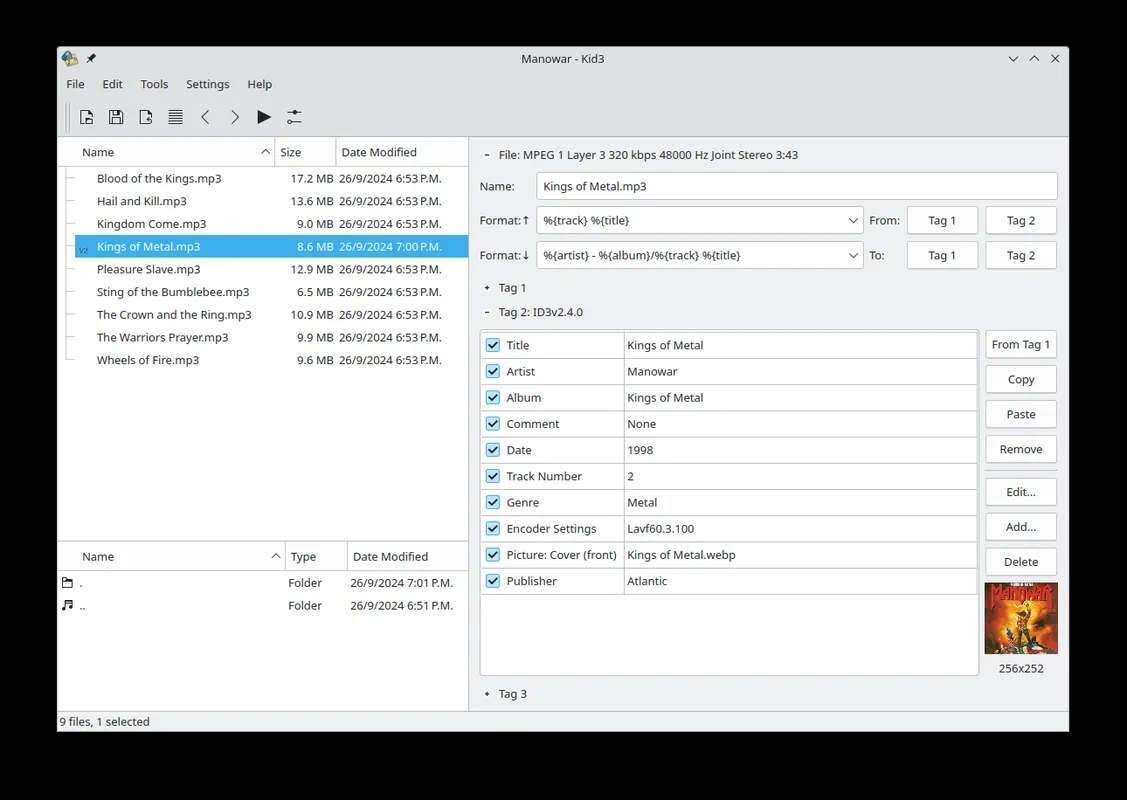
Kid3 is an open-source program for editing the tags of music files. It lets you edit titles, artists, albums and cover art in bulk across formats such as MP3, FLAC, Ogg and MP4.
cdn.kde.org · Official website
- ✓ Official source (winget)
- ✓ SHA256 taken from the official repository
- ✓ Last checked: Nov. 4, 2026
- This is not a virus scan. Check on VirusTotal
- Version
- 2025-07-24
- Release date
- July 24, 2025
- License
- GPL-2.0+
- Installer type
- zip
How do I use this?
Type Terminal in the Start menu and open it, paste the command (Ctrl+V or right-click) and press Enter. It uses winget, Windows' own package manager, to install the program from its official source.
winget install --id KDE.Kid3 -eSHA256 (file verification)
fc4d9b7bee7ac1d953cd26370baa59e3682d7fd1875eb36b917e3239154f6cd2downloads.sourceforge.net · Official website
- ✓ Official source (Homebrew)
- ✓ SHA256 taken from the official repository
- ✓ Last checked: Nov. 4, 2026
- This is not a virus scan. Check on VirusTotal
- Version
- 3.10.2
- License
- GPL-2.0+
- Installer type
- dmg
How do I use this?
This command needs Homebrew; if you don't have it, first run the install command from brew.sh. Then open Terminal (Applications > Utilities > Terminal), paste the command and press Enter.
brew install --cask kid3SHA256 (file verification)
851181d89f68f70a198153a0091fb40f6d0282a358db38268dfb00bf31279a95flathub.org · Official website
- ✓ Official source (Flathub)
- ✓ Last checked: Nov. 4, 2026
- Version
- 3.10.2
- Release date
- Oct. 8, 2026
- License
- GPL-2.0+
- Installer type
- flatpak
How do I use this?
Open a terminal, paste the command and press Enter. Flatpak and Flathub must be set up; Linux Mint has them by default, for other distributions see flathub.org/setup.
flatpak install flathub org.kde.kid3f-droid.org · Official website
- ✓ Official source (F-Droid)
- ✓ SHA256 taken from the official repository
- ✓ Last checked: Nov. 4, 2026
- This is not a virus scan. Check on VirusTotal
- Version
- 3.10.2
- Release date
- Oct. 12, 2026
- License
- GPL-2.0+
- Installer type
- apk
SHA256 (file verification)
4ab094b0473437255dd2b0dc93b85ecb59d9d760b824800d3652e742b44a5f86Highlights
- Edit tags in MP3, FLAC, Ogg, MP4 and other common formats
- Edit many files at once
- Create tags from file names and file names from tags
- Import details from online sources such as MusicBrainz and Discogs
- Add and replace album cover art
Who is it for?
For people who want a tidy music library, need to fill in missing song details or rename many audio files at once.
Good to know before installing
- The interface is plain and a bit dated; finding the fields can take time at first.
- It is not a music player; you need a separate program to listen to files.
Screenshots
How to install
Windows
- Click the official download button on this page.
- Open the downloaded file and start the program.
- Or install it with the winget command shown on the page.
macOS
- Download the .dmg file with the official button.
- Drag Kid3 into the Applications folder.
- Alternatively, use the Homebrew command shown on the page.
Linux
- Open the Flathub page with the button on this page.
- Or run the flatpak command shown on the page in a terminal.
- Open Kid3 and choose your music folder.
Android
- Open the F-Droid page with the Android button on this page.
- Install the app through F-Droid.
- Allow access to your music files when it starts.
Alternatives
- Mp3tag
- MusicBrainz Picard
- puddletag
Frequently asked questions
Is Kid3 free?
Yes. It is open source and free.
Can I edit several files at once?
Yes. Select the files and change shared fields in one go.
Can it look up song details online?
Yes. It can import album details and covers from sources such as MusicBrainz and Discogs.