

Mailspring
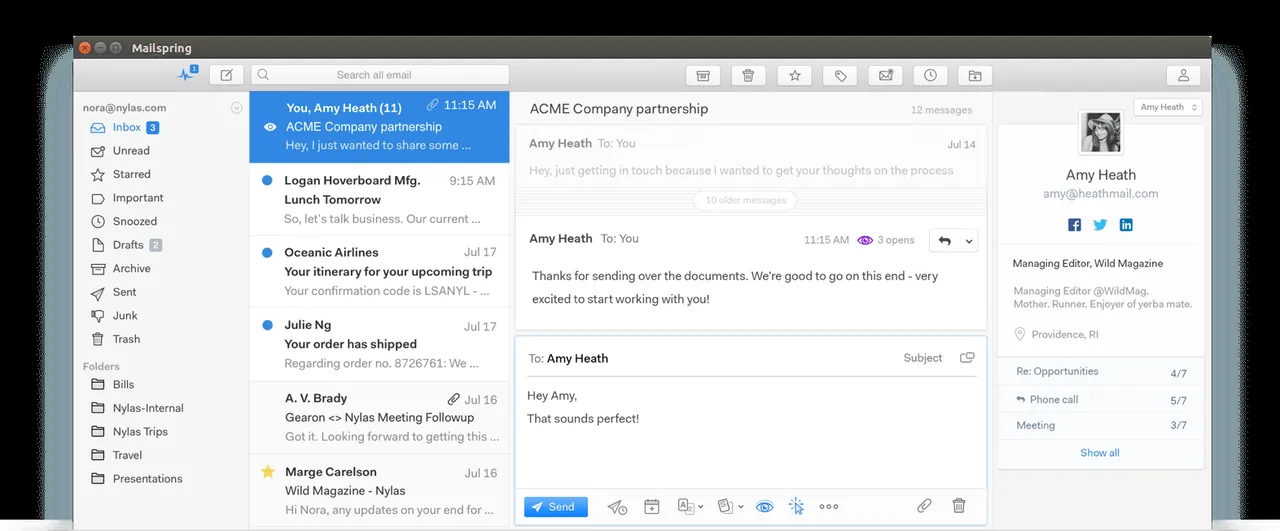
Mailspring is an open-source desktop email client designed for Linux, macOS, and Windows. Built as a fork of Nylas Mail with a rewritten C++ core engine, it provides unified inbox management, multiple account support, customizable themes, and integrated search capabilities for modern email workflows.
github.com · Official website
- ✓ Official source (winget)
- ✓ SHA256 taken from the official repository
- ✓ Last checked: Nov. 20, 2026
- This is not a virus scan. Check on VirusTotal
- Version
- 1.26.2
- Release date
- Oct. 22, 2026
- License
- GPL-3.0
- Installer type
- exe
How do I use this?
Type Terminal in the Start menu and open it, paste the command (Ctrl+V or right-click) and press Enter. It uses winget, Windows' own package manager, to install the program from its official source.
winget install --id Foundry376.Mailspring -eSHA256 (file verification)
a1dfcbf573f05f705ce717d6b7911f2e5a7d6aac0f7dfc0c824f3d78f44c5827github.com · Official website
- ✓ Official source (Homebrew)
- ✓ SHA256 taken from the official repository
- ✓ Last checked: Nov. 20, 2026
- This is not a virus scan. Check on VirusTotal
- Version
- 1.26.2
- License
- GPL-3.0
- Installer type
- zip
How do I use this?
This command needs Homebrew; if you don't have it, first run the install command from brew.sh. Then open Terminal (Applications > Utilities > Terminal), paste the command and press Enter.
brew install --cask mailspringSHA256 (file verification)
4ca6a0d995e51583c2dc4c43bdccfb4a96ed61867f0e8e18486954ba55f83dceflathub.org · Official website
- ✓ Official source (Flathub)
- ✓ Last checked: Nov. 20, 2026
- Version
- 1.26.2
- Release date
- Oct. 22, 2026
- License
- GPL-3.0
- Installer type
- flatpak
How do I use this?
Open a terminal, paste the command and press Enter. Flatpak and Flathub must be set up; Linux Mint has them by default, for other distributions see flathub.org/setup.
flatpak install flathub com.getmailspring.MailspringWe couldn't find a Android version of Mailspring in the official repositories; check the publisher's website.
You can try these instead:
Platform pages: Windows · macOS · Linux · Android
Old versions (10)
Security update: according to the publisher's release notes, Mailspring 1.26.2 fixes security vulnerabilities. If you use an older version, update.
Official release notes →
Mailspring 1.26.2: what's new?
- Security patch for compromised eMudhra intermediate certificates; Mailspring now delegates trust checks and consults system distrust stores across all secure connections.
- Fixed an issue where emails specifying a dark color scheme turned the message background black.
- Fixed the Back and Close buttons not responding to clicks during account setup.
- Fixed calendar and contacts sync leaving network connections open, which accumulated hundreds of open sockets over time.
Summarized from the publisher's release notes.
Highlights
- Unified inbox to manage emails across multiple IMAP and Gmail accounts in one place.
- Fast C++ sync engine designed to consume minimal memory and resources.
- Advanced search with query parsing and contact profile details.
- Customizable user interface with multiple themes and layouts.
- Support for keyboard shortcuts, signatures, and localized language translation.
Who is it for?
Mailspring is designed for professionals and general users who manage multiple email accounts daily and want a fast, clean desktop client.
Good to know before installing
- Requires active IMAP/SMTP configuration for custom email servers.
- POP3 protocol accounts are not natively supported.
- Some advanced syncing functions depend on the backend service infrastructure.
Screenshots
How to install
Windows
- Click the download button to get the official Windows installer.
- Run 'winget install --id Foundry376.Mailspring -e' in PowerShell or double-click the setup file.
- Follow the setup wizard instructions and launch Mailspring.
macOS
- Download the official setup file using our download button or use Homebrew.
- Run 'brew install --cask mailspring' in Terminal or open the DMG installer.
- Drag Mailspring to your Applications folder and launch it.
Linux
- Click the download button on our site to open the Flathub page.
- Run 'flatpak install flathub com.getmailspring.Mailspring' in your terminal.
- Launch Mailspring from your application menu.
Alternatives
- Mozilla Thunderbird
- Geary
- Evolution
Comparisons
Frequently asked questions
Is Mailspring free and open source?
Yes, Mailspring core is open-source software released under the GPL-3.0 license.
Which email providers are supported by Mailspring?
Mailspring supports major providers including Gmail, Outlook, Yahoo Mail, iCloud, and standard IMAP/SMTP accounts.
Does Mailspring require a Mailspring ID during setup?
An optional or required Mailspring ID link is used to sync preferences and specific features across devices.