

Transmission
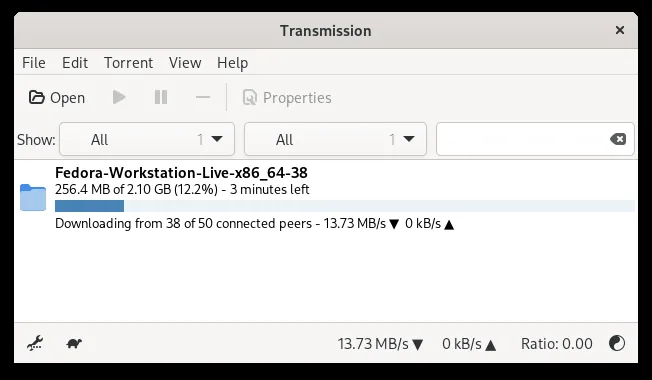
Transmission is a fast, lightweight, and open-source BitTorrent client created by the Transmission Project. Designed with an emphasis on low resource usage and a clean interface, it runs seamlessly across Linux, macOS, and Windows. It provides reliable peer-to-peer file sharing without third-party advertisements or bundled toolbars.
github.com · Official website
- ✓ Official source (winget)
- ✓ SHA256 taken from the official repository
- ✓ Last checked: Nov. 4, 2026
- This is not a virus scan. Check on VirusTotal
- Version
- 4.1.3
- Release date
- June 30, 2026
- License
- GPLv3
- Installer type
- wix
How do I use this?
Type Terminal in the Start menu and open it, paste the command (Ctrl+V or right-click) and press Enter. It uses winget, Windows' own package manager, to install the program from its official source.
winget install --id Transmission.Transmission -eSHA256 (file verification)
c8ea492d8f46fadac26e0c05b244cabba556201d5fe348dfcf1cf036621741f8github.com · Official website
- ✓ Official source (Homebrew)
- ✓ SHA256 taken from the official repository
- ✓ Last checked: Nov. 4, 2026
- This is not a virus scan. Check on VirusTotal
- Version
- 4.1.4
- License
- GPLv3
- Installer type
- dmg
How do I use this?
This command needs Homebrew; if you don't have it, first run the install command from brew.sh. Then open Terminal (Applications > Utilities > Terminal), paste the command and press Enter.
brew install --cask transmissionSHA256 (file verification)
495c5d21d515c8deb859b0db6692fd5606644a1613c2cac87c1d3e7672755a59flathub.org · Official website
- ✓ Community package (Flathub)
- ✓ Last checked: Nov. 4, 2026
- Version
- 4.1.4
- Release date
- Oct. 24, 2026
- License
- GPLv3
- Installer type
- flatpak
How do I use this?
Open a terminal, paste the command and press Enter. Flatpak and Flathub must be set up; Linux Mint has them by default, for other distributions see flathub.org/setup.
flatpak install flathub com.transmissionbt.TransmissionWe couldn't find a Android version of Transmission in the official repositories; check the publisher's website.
You can try these instead:
Security update: according to the publisher's release notes, Transmission 4.1.3 fixes security vulnerabilities. If you use an older version, update.
Official release notes →
Transmission 4.1.3: what's new?
- Fixed a potential CSRF security issue for users with remote access enabled by resolving a CORS bug that leaked the anti-CSRF nonce.
- Fixed a use-after-free bug in the peer code.
Summarized from the publisher's release notes.
Highlights
- Minimalist design with very low RAM and CPU footprint
- Ad-free and open-source under the GPLv3 license
- Built-in web interface for remote management via browser
- Full support for encryption, magnet links, and bandwidth scheduling
Who is it for?
Ideal for users seeking a lightweight torrent client without clutter, as well as system administrators managing headless servers or media centers.
Good to know before installing
- The interface is deliberately minimal and lacks advanced built-in media players.
- It does not include an integrated torrent search engine; you must supply .torrent files or magnet links.
- No official native builds are available for mobile operating systems.
Screenshots
How to install
Windows
- Click the official download button on our page to fetch the official setup executable.
- Alternatively, run 'winget install --id Transmission.Transmission -e' in Command Prompt or PowerShell.
- Follow the setup wizard to complete installation and launch Transmission.
macOS
- Download the official installer using the button on our site, or run 'brew install --cask transmission' in Terminal.
- Open the downloaded .dmg disk image and drag Transmission into your Applications folder.
- Open Transmission from your Applications folder to begin using it.
Linux
- Click the official download button on our site to view the Flathub page.
- Alternatively, run 'flatpak install flathub com.transmissionbt.Transmission' in your terminal.
- Launch Transmission from your application launcher once setup completes.
Alternatives
- qBittorrent
- Deluge
- BiglyBT
Frequently asked questions
Is Transmission free software?
Yes, Transmission is completely free and open-source under the GPLv3 license, with no premium tiers or advertisements.
Can I manage Transmission remotely?
Yes, Transmission features an integrated web UI and RPC protocol that allows full control from another computer or browser.
Does Transmission support magnet links?
Yes, Transmission natively opens magnet links and torrent files to retrieve metadata and start downloads.