

LosslessCut
LosslessCut is an open-source graphical user interface for FFmpeg designed for fast, lossless trimming and cutting of video and audio files without re-encoding.
github.com · Official website
- ✓ Official source (winget)
- ✓ SHA256 taken from the official repository
- ✓ Last checked: Nov. 4, 2026
- This is not a virus scan. Check on VirusTotal
- Version
- 3.70.2
- Release date
- Oct. 28, 2026
- License
- GPL-2.0-only
- Installer type
- zip
How do I use this?
Type Terminal in the Start menu and open it, paste the command (Ctrl+V or right-click) and press Enter. It uses winget, Windows' own package manager, to install the program from its official source.
winget install --id ch.LosslessCut -eSHA256 (file verification)
a804a7d466b91561bb62f894cdd9848ad0f1a0082d76529e1d3dd80d20549d54github.com · Official website
- ✓ Official source (Homebrew)
- ✓ SHA256 taken from the official repository
- ✓ Last checked: Nov. 4, 2026
- This is not a virus scan. Check on VirusTotal
- Version
- 3.70.2
- License
- GPL-2.0-only
- Installer type
- dmg
How do I use this?
This command needs Homebrew; if you don't have it, first run the install command from brew.sh. Then open Terminal (Applications > Utilities > Terminal), paste the command and press Enter.
brew install --cask losslesscutSHA256 (file verification)
3c0e2b3ec25fec66cf0cef343450d9a333e4bba5d64456c34cd18e891a3f5947flathub.org · Official website
- ✓ Community package (Flathub)
- ✓ Last checked: Nov. 4, 2026
- Version
- 3.69.0
- Release date
- June 3, 2026
- License
- GPL-2.0-only
- Installer type
- flatpak
How do I use this?
Open a terminal, paste the command and press Enter. Flatpak and Flathub must be set up; Linux Mint has them by default, for other distributions see flathub.org/setup.
flatpak install flathub no.mifi.losslesscutWe couldn't find a Android version of LosslessCut in the official repositories; check the publisher's website.
LosslessCut 3.70.2: what's new?
Highlights
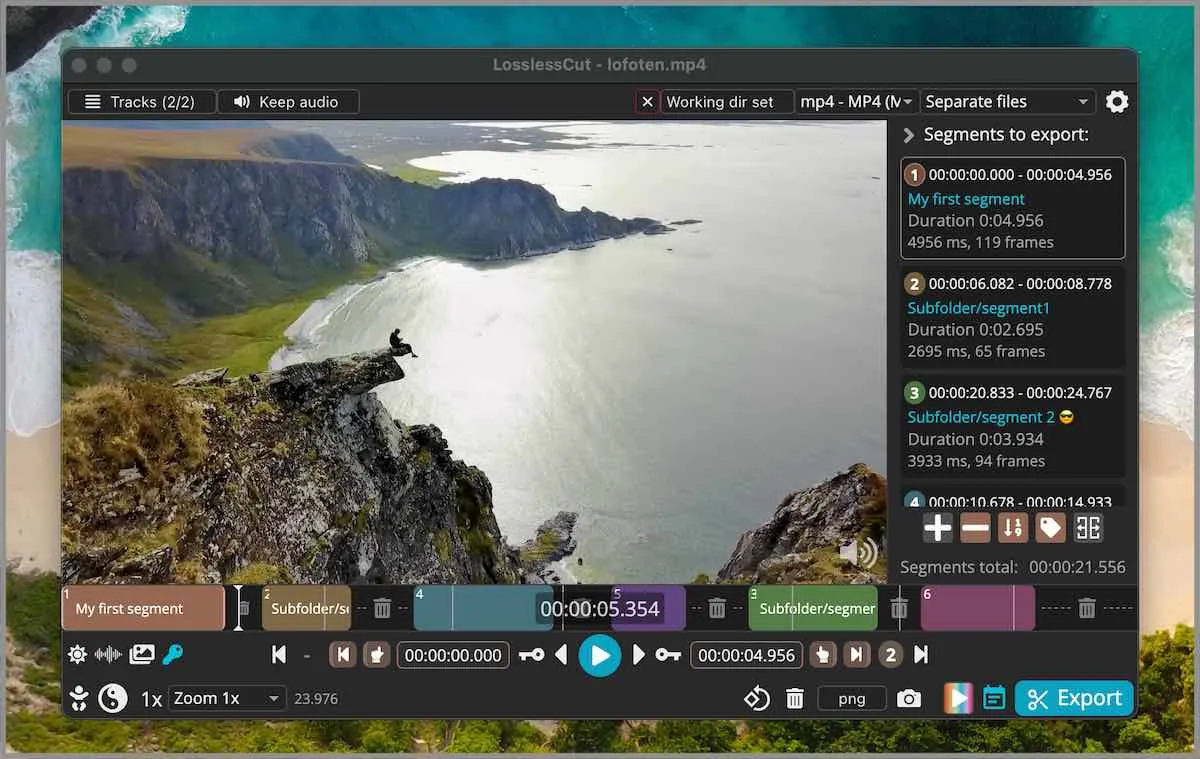
- Lossless cutting and trimming of video and audio streams
- Near-instant processing without re-encoding
- Broad multimedia format support powered by FFmpeg
- Segment merging and cut-point adjustment
Who is it for?
Designed for content creators, video archivists, and casual users who need to quickly trim, cut, or split large video and audio files without losing quality or waiting for re-encoding.
Good to know before installing
- Lossless cuts are constrained to keyframes; precise frame-by-frame cuts may require smart cut or re-encoding.
- Lacks advanced non-linear editing capabilities such as transitions, color grading, multi-track audio mixing, or visual effects.
- While fully free and open-source via direct downloads, convenience builds on app stores are sold as paid options to support development.
Screenshots
How to install
Windows
- Download the installer using our official download button, or run 'winget install --id ch.LosslessCut -e' in a terminal.
- Run the setup file and follow the standard installation prompts.
- Launch LosslessCut from the Start menu.
macOS
- Download the official file via our download button, or run 'brew install --cask losslesscut' in Terminal.
- Move the application into your Applications folder.
- Open LosslessCut to start editing.
Linux
- Visit the Flathub page using our download link, or execute 'flatpak install flathub no.mifi.losslesscut' in a terminal.
- Complete the installation following your desktop prompts.
- Launch LosslessCut from your application menu.
Alternatives
Frequently asked questions
Does LosslessCut reduce video quality?
No, it copies media streams directly without re-encoding, preserving the original quality.
Is LosslessCut free to use?
Yes, LosslessCut is free and open-source software distributed under the GPL-2.0 license.
Why does the cutting process finish so quickly?
It cuts along keyframes without performing a full transcode of the media data.