
TeXstudio
TeXstudio is a free, open-source editor for writing LaTeX documents. Syntax highlighting, autocompletion and a built-in PDF viewer make it easier to prepare theses, papers and math-heavy documents.
github.com · Official website
- ✓ Official source (winget)
- ✓ SHA256 taken from the official repository
- ✓ Last checked: Nov. 20, 2026
- This is not a virus scan. Check on VirusTotal
- Version
- 4.9.8
- Release date
- Sept. 11, 2026
- License
- GPL-3.0
- Installer type
- nullsoft
How do I use this?
Type Terminal in the Start menu and open it, paste the command (Ctrl+V or right-click) and press Enter. It uses winget, Windows' own package manager, to install the program from its official source.
winget install --id TeXstudio.TeXstudio -eSHA256 (file verification)
243d64e65bbefff706c92b58fb1a56b6e024fbb1fb11dffc623e59c18b0ab397github.com · Official website
- ✓ Official source (Homebrew)
- ✓ SHA256 taken from the official repository
- ✓ Last checked: Nov. 20, 2026
- This is not a virus scan. Check on VirusTotal
- Version
- 4.9.7
- License
- GPL-3.0
- Installer type
- zip
How do I use this?
This command needs Homebrew; if you don't have it, first run the install command from brew.sh. Then open Terminal (Applications > Utilities > Terminal), paste the command and press Enter.
brew install --cask texstudioSHA256 (file verification)
5ac66e53c7cfab83621e50db3287edc7f977b2e5259806949a3915090f1898b1flathub.org · Official website
- ✓ Official source (Flathub)
- ✓ Last checked: Nov. 20, 2026
- Version
- 4.9.9
- Release date
- Oct. 23, 2026
- License
- GPL-3.0
- Installer type
- flatpak
How do I use this?
Open a terminal, paste the command and press Enter. Flatpak and Flathub must be set up; Linux Mint has them by default, for other distributions see flathub.org/setup.
flatpak install flathub org.texstudio.TeXstudioWe couldn't find a Android version of TeXstudio in the official repositories; check the publisher's website.
You can try these instead:
Platform pages: Windows · macOS · Linux · Android
Old versions (10)
TeXstudio 4.9.8: what's new?
Highlights
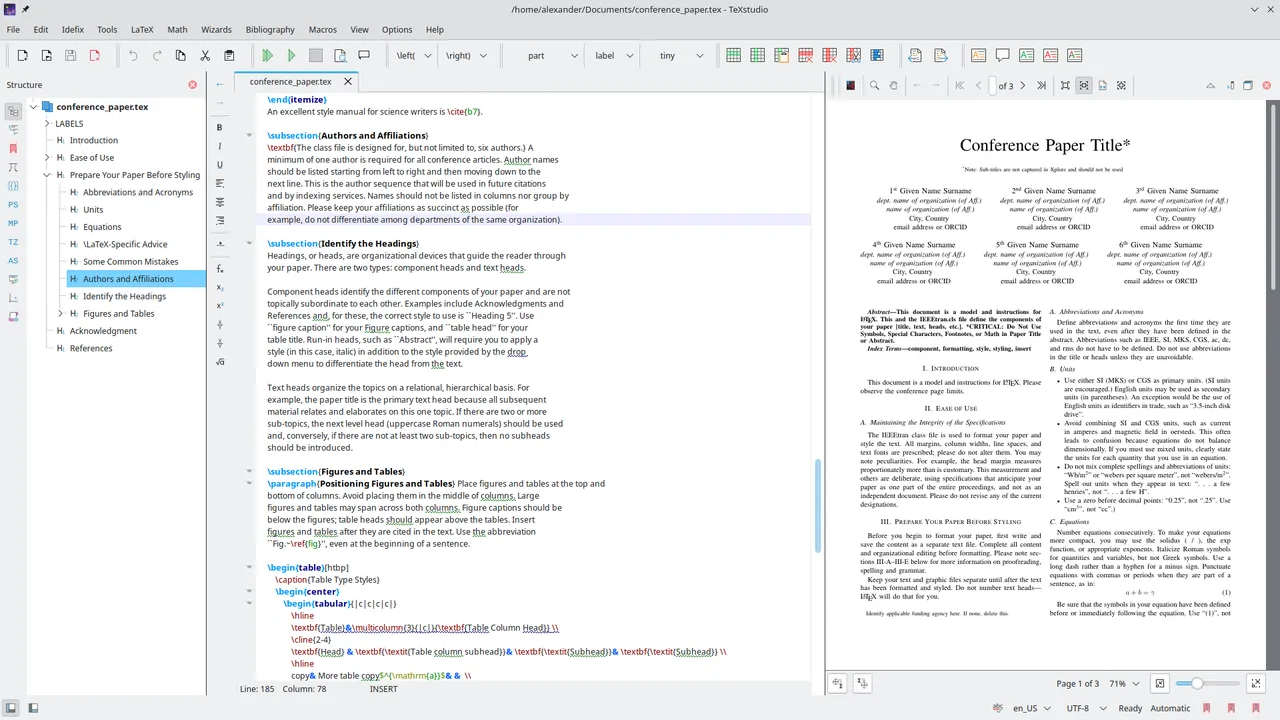
- Syntax highlighting and LaTeX command autocompletion
- Built-in viewer with source-to-PDF sync
- Shows compile errors and warnings on their lines
- Table, formula and template helpers, spell checking
Who is it for?
For academics and students writing theses and papers, and anyone preparing math-heavy documents.
Good to know before installing
- A TeX distribution must be installed separately; TeXstudio alone cannot compile documents.
- People new to LaTeX face a learning curve.
Screenshots
How to install
Windows
- Click the official download button on this page or use the winget command.
- Run the installer and follow the steps.
- Install MiKTeX or TeX Live separately to compile documents.
macOS
- Use the Homebrew command or download from the official site.
- Move the app to the Applications folder and open it.
- Install MiKTeX or TeX Live separately to compile documents.
Linux
- Run the Flatpak command in a terminal.
- Open the program from the application menu.
- Install MiKTeX or TeX Live separately to compile documents.
Alternatives
Comparisons
Frequently asked questions
Is TeXstudio free?
Yes. It is open source and free.
Is it enough on its own?
No, TeXstudio is an editor. To compile documents to PDF you also need a TeX distribution such as MiKTeX or TeX Live.
Can I use it without knowing LaTeX?
You need basic LaTeX knowledge. Ready-made commands in the menus and templates make learning easier.