

Thonny
Thonny is a free, open-source development environment designed for Python beginners. It was developed at the University of Tartu and comes with Python built in, so you can start writing code right after installing it.
github.com · Official website
- ✓ Official source (winget)
- ✓ SHA256 taken from the official repository
- ✓ Last checked: Nov. 20, 2026
- This is not a virus scan. Check on VirusTotal
- Version
- 5.0.1
- Release date
- Oct. 28, 2026
- License
- MIT
- Installer type
- inno
How do I use this?
Type Terminal in the Start menu and open it, paste the command (Ctrl+V or right-click) and press Enter. It uses winget, Windows' own package manager, to install the program from its official source.
winget install --id AivarAnnamaa.Thonny -eSHA256 (file verification)
a2b04784cd2ee7d4c22ed46865de5e8ba6eaf55950543ef9546374f53cf778a5github.com · Official website
- ✓ Official source (Homebrew)
- ✓ SHA256 taken from the official repository
- ✓ Last checked: Nov. 20, 2026
- This is not a virus scan. Check on VirusTotal
- Version
- 5.0.1
- License
- MIT
- Installer type
- pkg
How do I use this?
This command needs Homebrew; if you don't have it, first run the install command from brew.sh. Then open Terminal (Applications > Utilities > Terminal), paste the command and press Enter.
brew install --cask thonnySHA256 (file verification)
d82bcac04b9e010695fbc7a7d176188a5aa731bdcff163f4d3d7a32c6beefe50flathub.org · Official website
- ✓ Official source (Flathub)
- ✓ Last checked: Nov. 20, 2026
- Version
- 5.0.1
- Release date
- Oct. 26, 2026
- License
- MIT
- Installer type
- flatpak
How do I use this?
Open a terminal, paste the command and press Enter. Flatpak and Flathub must be set up; Linux Mint has them by default, for other distributions see flathub.org/setup.
flatpak install flathub org.thonny.ThonnyWe couldn't find a Android version of Thonny in the official repositories; check the publisher's website.
Platform pages: Windows · macOS · Linux · Android
Old versions (10)
Thonny 5.0.1: what's new?
Highlights
- Comes with Python; no separate installation needed
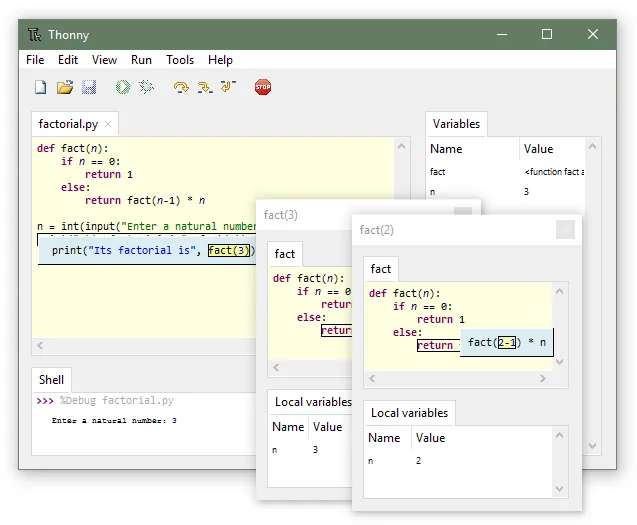
- Debugger that shows step by step how code runs
- Panel that shows variables live
- Simple package manager and MicroPython support for microcontrollers
Who is it for?
For students learning Python, teachers running programming classes and hobbyists working with MicroPython boards.
Good to know before installing
- It lacks advanced features for large projects (advanced refactoring, a wide plugin ecosystem).
- It does not support languages other than Python.
Screenshots
How to install
Windows
- Click the official download button on this page or use the winget command.
- Run the installer and follow the steps.
macOS
- Use the Homebrew command or download from the official site.
- Move the app to the Applications folder and open it.
Linux
- Run the Flatpak command in a terminal.
- Open the program from the application menu.
Alternatives
Comparisons
Frequently asked questions
Is Thonny free?
Yes. It is open source and free.
Do I need to install Python separately?
No, the Windows and macOS installers come with their own Python. You can pick another Python on your computer in the settings if you want.
Does it work with boards like the Raspberry Pi Pico?
Yes, you can connect to boards running MicroPython and upload code directly to the board.