

OpenShot
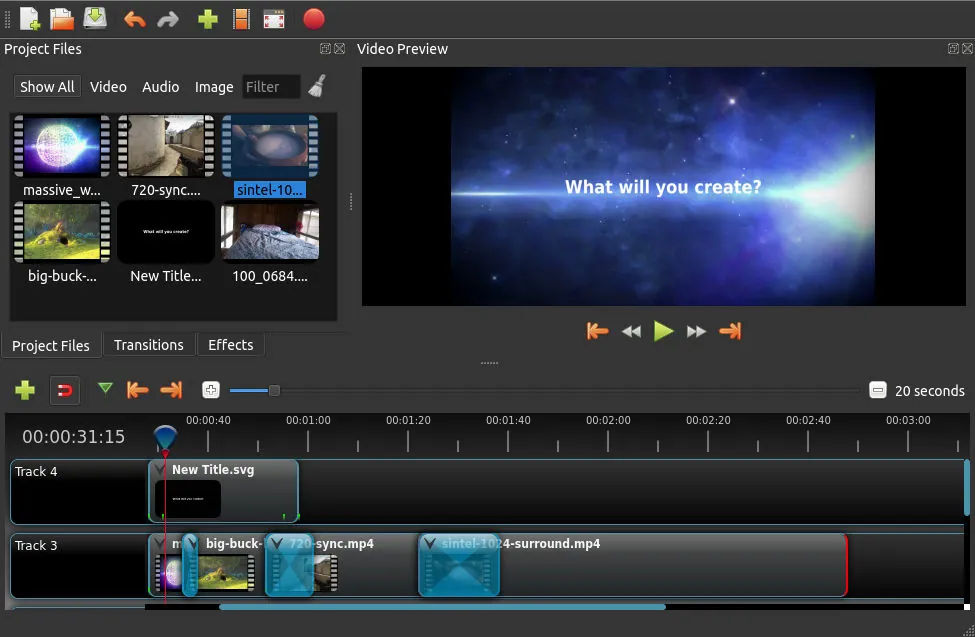
OpenShot is a free and open-source non-linear video editor developed by OpenShot Studios. It provides an intuitive interface for trimming clips, arranging media on multiple tracks, adjusting audio, and applying transitions or video effects.
github.com · Official website
- ✓ Official source (winget)
- ✓ SHA256 taken from the official repository
- ✓ Last checked: Nov. 4, 2026
- This is not a virus scan. Check on VirusTotal
- Version
- 4.1.1
- Release date
- Nov. 2, 2026
- License
- GPL-3.0
- Installer type
- inno
How do I use this?
Type Terminal in the Start menu and open it, paste the command (Ctrl+V or right-click) and press Enter. It uses winget, Windows' own package manager, to install the program from its official source.
winget install --id OpenShot.OpenShot -eSHA256 (file verification)
6c18abf951a798b536b07aa88f78d62eb55345903699b429b08322323c049690github.com · Official website
- ✓ Official source (Homebrew)
- ✓ SHA256 taken from the official repository
- ✓ Last checked: Nov. 4, 2026
- This is not a virus scan. Check on VirusTotal
- Version
- 4.1.1
- License
- GPL-3.0
- Installer type
- dmg
How do I use this?
This command needs Homebrew; if you don't have it, first run the install command from brew.sh. Then open Terminal (Applications > Utilities > Terminal), paste the command and press Enter.
brew install --cask openshot-video-editorSHA256 (file verification)
ba2a8e333b743f7b4e5195fe66961b1708cd1b94bc1c0f9d6485343f2ab1d471flathub.org · Official website
- ✓ Community package (Flathub)
- ✓ Last checked: Nov. 4, 2026
- Version
- 3.5.1
- Release date
- April 2, 2026
- License
- GPL-3.0
- Installer type
- flatpak
How do I use this?
Open a terminal, paste the command and press Enter. Flatpak and Flathub must be set up; Linux Mint has them by default, for other distributions see flathub.org/setup.
flatpak install flathub org.openshot.OpenShotWe couldn't find a Android version of OpenShot in the official repositories; check the publisher's website.
OpenShot 4.1.1: what's new?
- Added AMD AMF and HEVC NVENC/QSV GPU export presets and improved GPU validation before falling back to CPU encoding.
- Improved saving reliability on Windows and network shares.
- Fixed Mac VideoToolbox export crashes and restored Qt6 event compatibility.
Summarized from the publisher's release notes.
Highlights
- Unlimited audio and video tracks on a multi-track timeline
- Video trimming, slicing, scaling, and real-time previews
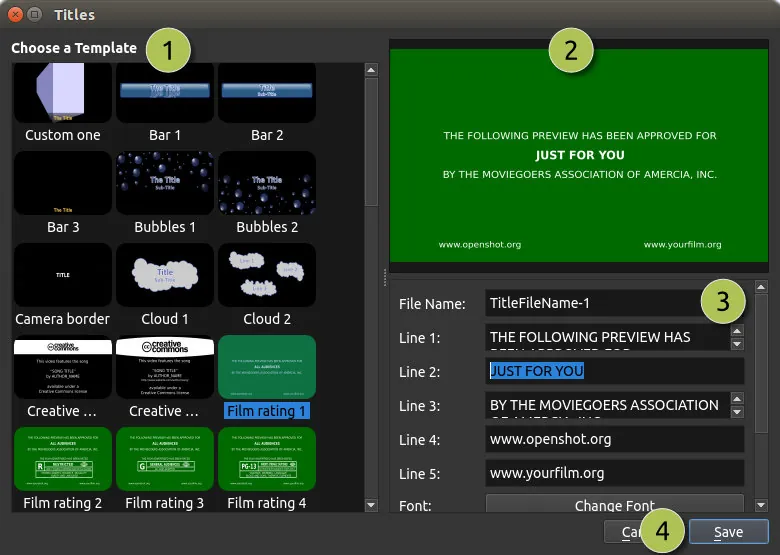
- Built-in title editor and support for animated 3D titles
- Keyframe-based animation framework for clips and properties
- Audio waveform visualization and volume mixing
Who is it for?
OpenShot is designed for beginners, students, and casual video creators who need to quickly edit vlogs, presentations, or home videos without mastering complex professional editing suites.
Good to know before installing
- Can experience performance slowdowns with large high-resolution video files or complex timelines.
- Advanced 3D title animations require downloading and configuring Blender separately.
- Color grading and audio mastering tools are basic compared to professional NLEs.
Screenshots
How to install
Windows
- Click the official download button to get the Windows installer, or use winget.
- Run 'winget install --id OpenShot.OpenShot -e' or launch the downloaded installer.
- Follow the setup wizard to complete the installation.
macOS
- Click the official download button to get the installer DMG, or use Homebrew.
- Run 'brew install --cask openshot-video-editor' or open the DMG and drag OpenShot to Applications.
- Open OpenShot from Launchpad or Applications.
Linux
- Click the official download button to open Flathub, or use your terminal.
- Run 'flatpak install flathub org.openshot.OpenShot'.
- Launch OpenShot from your application menu.
Alternatives
Frequently asked questions
Is OpenShot completely free to use?
Yes, OpenShot is open-source software licensed under GPL-3.0, free for personal and commercial use without watermarks.
Can OpenShot export 4K video?
Yes, OpenShot supports exporting video at various resolutions and frame rates, including 4K.
Why do 3D animated titles require Blender?
OpenShot delegates 3D rendering to Blender, so Blender must be installed and configured in OpenShot preferences to use 3D title templates.