

Signal
Signal is an open-source, encrypted messaging application focused on user privacy and security. It supports text messages, voice calls, video chats, and media sharing across mobile and desktop devices using end-to-end encryption.
updates.signal.org · Official website
- ✓ Official source (winget)
- ✓ File is identical to the one the publisher released (SHA256 matched)
- ✓ Last checked: Nov. 4, 2026
- This is not a virus scan. Check on VirusTotal
- Version
- 8.33.0
- Release date
- Oct. 28, 2026
- License
- AGPL-3.0
- Installer type
- nullsoft
How do I use this?
Type Terminal in the Start menu and open it, paste the command (Ctrl+V or right-click) and press Enter. It uses winget, Windows' own package manager, to install the program from its official source.
winget install --id OpenWhisperSystems.Signal -eSHA256 (file verification)
df95876a3986d234e1e26d74fb2cb37690e0e18751273b0455bf7a71dc5cdda3updates.signal.org · Official website
- ✓ Official source (Homebrew)
- ✓ File is identical to the one the publisher released (SHA256 matched)
- ✓ Last checked: Nov. 4, 2026
- This is not a virus scan. Check on VirusTotal
- Version
- 8.33.0
- License
- AGPL-3.0
- Installer type
- zip
How do I use this?
This command needs Homebrew; if you don't have it, first run the install command from brew.sh. Then open Terminal (Applications > Utilities > Terminal), paste the command and press Enter.
brew install --cask signalSHA256 (file verification)
4cb13e49041388c70cf7d9603c0c28cf62d7b6d12687418b39316bbe6ff1eb1aflathub.org · Official website
- ✓ Community package (Flathub)
- ✓ Last checked: Nov. 4, 2026
- Version
- 8.33.0
- Release date
- Oct. 28, 2026
- License
- AGPL-3.0
- Installer type
- flatpak
How do I use this?
Open a terminal, paste the command and press Enter. Flatpak and Flathub must be set up; Linux Mint has them by default, for other distributions see flathub.org/setup.
flatpak install flathub org.signal.Signalplay.google.com · Official website
- ✓ Official source (Google Play)
- ✓ Last checked: Nov. 4, 2026
- License
- AGPL-3.0
Highlights
- End-to-end encryption by default for messages, voice, and video calls
- Disappearing messages with customizable expiration timers
- Group chats, voice calls, and group video conferencing
- Media, document, and location sharing with privacy protections
- Cross-platform synchronization between mobile and desktop clients
Who is it for?
Signal is designed for individuals, journalists, and privacy-conscious users who need end-to-end encrypted communication for personal or professional chats.
Good to know before installing
- Requires a phone number for account creation and registration.
- Desktop apps cannot function independently without linking to a primary mobile device.
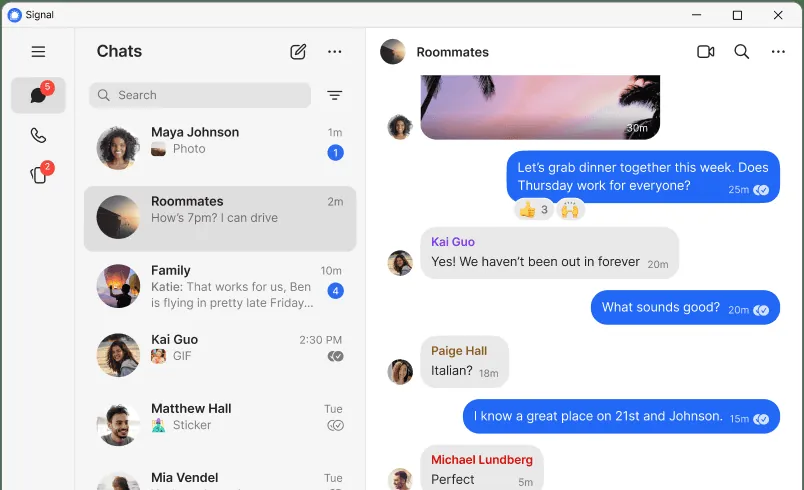
Screenshots
How to install
Windows
- Click the official download button to fetch the installer, or open Command Prompt.
- Optionally run: winget install --id OpenWhisperSystems.Signal -e
- Run the setup file and follow the on-screen instructions to finish.
macOS
- Click the official download button to get the installer package, or open Terminal.
- Optionally run: brew install --cask signal
- Open the downloaded file, drag Signal to Applications, and launch it.
Linux
- Click the official download button to view on Flathub, or open a terminal.
- Run the command: flatpak install flathub org.signal.Signal
- Launch Signal from your application menu or terminal.
Android
- Tap the official download button to open the Google Play Store.
- Tap Install to download the Signal app.
- Open Signal and register using your phone number.
Alternatives
Frequently asked questions
Is Signal free to use?
Yes, Signal is completely free and open-source software with no ads or subscriptions.
Do I need a phone number to sign up for Signal?
Yes, Signal requires a valid phone number for account creation and device verification.
Can I use Signal on desktop without a smartphone?
No, Signal Desktop requires linking to an active Signal account on a mobile device.